There is a moment on almost every project where the work needs to reach inside the store. A new pricing rule, a routing behaviour, a panel in the admin, a compliance step. And the default next sentence is: “Can you give us access?” A staff login, a collaborator account, the keys to the whole shop. It feels like the only way to get the work done.
It is not. For a large class of work, the cleaner answer is a custom app: a self-contained piece of software that installs with only the permissions it needs, runs on its own backend, and comes out without a trace. You keep your keys. The capability still arrives.
01 · The blocker
Why “just give us access” stalls a project.
Handing over admin access is rarely a quick yes, and it should not be. A full login can read your customers and orders, change prices, edit your theme, and touch your payment and shipping settings. That is a lot of trust to extend to anyone outside the business, and a lot of surface area if a credential ever leaks.
So the request sits. It waits on a security review, on a manager who is travelling, on a policy that forbids sharing logins at all — common in larger brands, franchises, and anyone under a compliance regime. The work is ready; the access is not. And even once granted, a broad login tends to outlive the project: months later it is still active, still powerful, and nobody quite remembers who has it.
02 · The alternative
What a custom app changes.
An app inverts the model. Instead of a person logging into your store, a piece of software is granted a narrow, explicit set of permissions — and only those. You see the exact list at install and approve it. Read orders but not customers. Write to the storefront but never touch settings. Nothing more than the job requires.
Three things follow from that, and they are the whole point:
- Scoped, not total. The app can do its one job and is structurally incapable of the rest. There is no “while you’re in there” risk, because it was never in there.
- Its own home. The app’s logic and data live on its own backend, not as edits scattered through your admin and theme. Your store stays yours.
- Reversible. Uninstalling revokes its access in one action and destroys its token. No account to hunt down and disable later.
The developer builds and hosts it. They never need a password to your shop — they need an install link, which you can revoke.
03 · In practice
A build we shipped.
A concrete example makes it real. A hardware brand runs three regional Shopify stores — global, Europe, and the US — inside one Shopify Plus organisation, and wanted every shopper sent automatically to the store for their country, with a manual region switcher for anyone who wanted to override. Useful, and precisely the kind of behaviour no off-the-shelf app covers well.
We built it as Geo Store Router: a custom app on a Cloudflare Workers backend, with an embedded admin where the merchant sets the country rules, and a theme app extension that renders the switcher on the storefront. It installs across all three stores in the organisation from a single link.
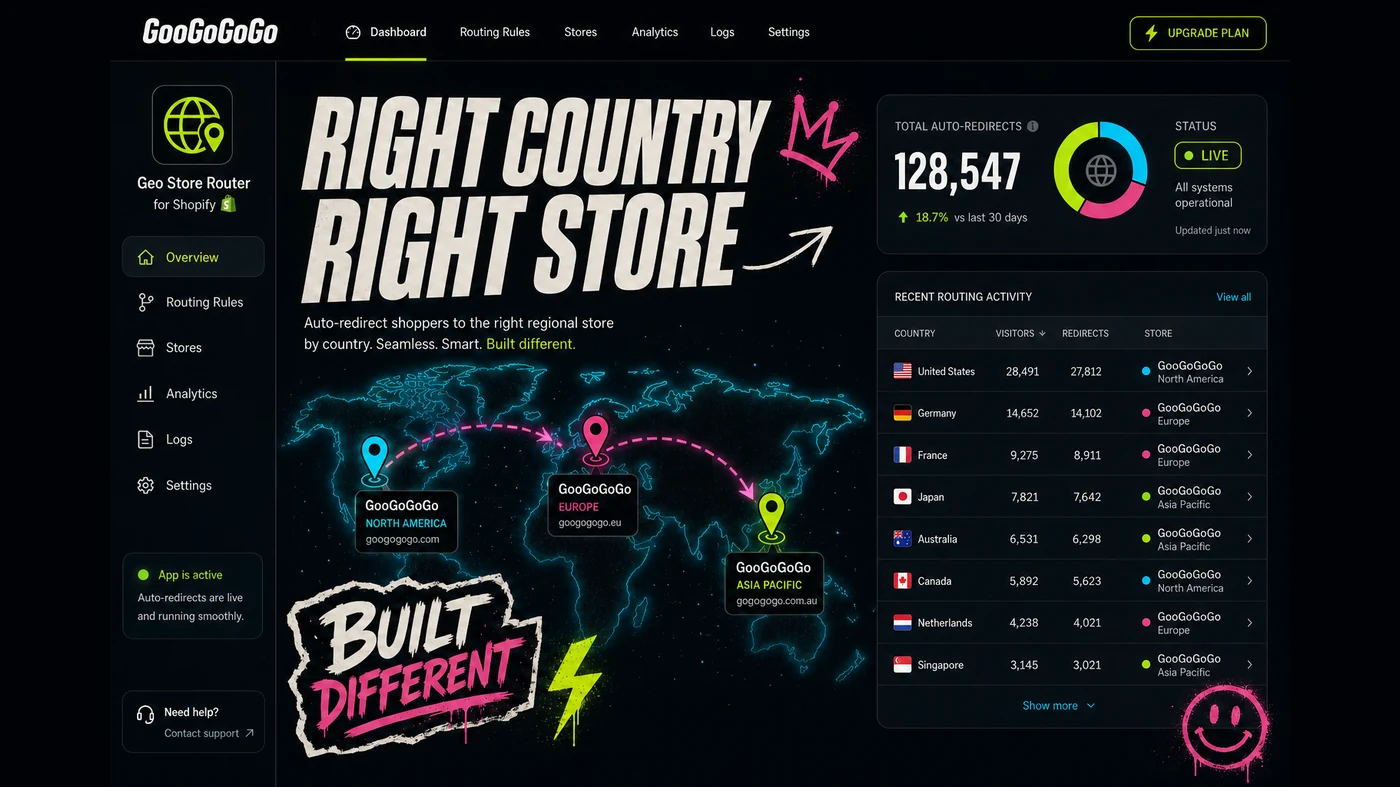
The relevant part for this article: at no point did we need a staff login to any of the three stores. The merchant clicked an install link, approved the permissions, and the app did the rest — routing shoppers by country, remembering their choice across stores, and staying out of the way of search engines to protect SEO. Nothing was written into any theme.
04 · The standard
What “clean” actually means.
“An app instead of access” only holds up if the app is built to a standard that earns the trust it is given. That means a few non-negotiables:
- Theme app extensions, never theme edits. Anything on the storefront is delivered through Shopify’s extension system, so uninstalling removes it completely and leaves no orphaned code behind.
- The token encrypted at rest. The access the app is granted is stored encrypted, not sitting in plain text in a database.
- Least privilege. The app requests the narrowest scopes that do the job, so even the app’s own reach is small.
- You own the code. The work is yours to host and take elsewhere. Ask about this before the project starts, not after.
Built that way, an app is not just a workaround for access you could not get — it is genuinely the safer, cleaner way to add the capability, whether or not access was ever on the table.
05 · Honestly
Access or app — which one, when.
An app is not always the answer, and pretending otherwise would be the same overselling this article is arguing against. Some work genuinely needs a person in the admin: a one-off content fix, a theme redesign, configuring settings that have no API. For those, scoped, time-boxed access — granted, used, and promptly revoked — is the right tool.
The app is the right answer when the need is ongoing behaviour rather than a one-time change: pricing logic, routing, a recurring panel, anything that has to keep running after the developer has gone. If the thing you want is a capability the store should simply have, build the app. If it is a change someone needs to make once, scoped access is fine. A good developer will tell you which one you are actually looking at.
FAQ
Questions we get.
Can a developer add features to my store without full admin access?
Yes. A custom app installs with only the access scopes it needs — often read-only for the data it touches — and runs on its own backend. You approve the exact permissions at install, and nothing else in the store is exposed. The developer builds and hosts the app; they never need a login to your admin.
Is a custom app safer than giving someone a staff or collaborator account?
Usually. A staff or collaborator login is broad and lives until someone remembers to revoke it. An app’s permissions are explicit, scoped to what it does, and visible in your admin — and uninstalling it destroys its access token immediately, with no lingering account to clean up.
What happens to the app and my store if we stop working together?
You own the code and can host it yourself. Uninstalling the app removes its access, and because any storefront code ships as a theme app extension rather than edits to your theme files, nothing is left behind. The store returns to exactly how it was.
Quick check
Could this be an app instead of a login?
- The need is ongoing behaviour, not a one-time content or design change.
- Sharing a full admin login is slow, forbidden, or a security concern.
- The work only really needs a few specific permissions, not the whole store.
- You want it to keep working after the developer has moved on.
- You want to own the code and be able to remove it cleanly.
Keep your keys. Ship the capability.
The instinct to solve every store change with a login is understandable — it is how most work has always been done. But for anything that is really a capability rather than a one-off edit, a custom app is the better trade: the store gets what it needs, your access stays locked down, and when the job is done the whole thing comes out clean. If a developer’s first move is to ask for the keys to everything, it is worth asking whether an app would have done it without them.