Q Answers · Apps
Who can build a custom Shopify app for my store?
You need a custom Shopify app when your workflow does not exist on the App Store, or when the public app that is close enough would cost more in workarounds than a purpose-built tool would cost to build.
GooGoGoGo builds production Shopify apps end to end — OAuth install flow, embedded admin interface, webhooks, theme app extensions and hosted backend — alongside the storefront work most studios stop at.
Scope your app — free call Free first concept before any deposit — we reply within 24h.
- 22 client stores you can open
- 29 free Shopify tools, live now
- $299 where fixed-scope fixes start

01 When it's the right call
When a custom app is genuinely the right call
Custom apps are often proposed when a cheaper answer exists. Build one when:
- No public app covers the workflow. Pricing tied to a live commodity index, routing shoppers between your own stores, a compliance panel for a specific regulation — these are usually unserved.
- The public app fits, but you are paying for 90% you do not use and its per-order pricing scales faster than your margin.
- Your data has to stay in your own systems rather than a third party's database.
- You need it embedded in the Shopify admin so your team never leaves the tool they already use.
If a public app does the job, install the public app. A good developer will tell you that.
02 Custom vs public
Custom distribution or a public App Store app?
The two are built the same way; the difference is how they are installed and whether Shopify reviews them first.
| Custom distribution | Public App Store | |
|---|---|---|
| Shopify review | Not required | Required — takes weeks |
| Listing fee | None | Yes |
| Who can install | Only the merchants you send a link | Anyone, once approved |
| Multi-store | Covers one Shopify Plus organisation | Per-store install |
| Best for | A tool built for your business | A product sold to many merchants |
If the app is for your business only, custom distribution is almost always the right choice — it installs immediately, with no review to wait on.
03 What it takes
What building a Shopify app actually involves
The interface is the small part. A production app needs all of this before a real merchant can install it:
That last point catches people out regularly: a public app cannot be installed on a production store until it has passed Shopify's review.
04 A live example
What one looks like, shipped
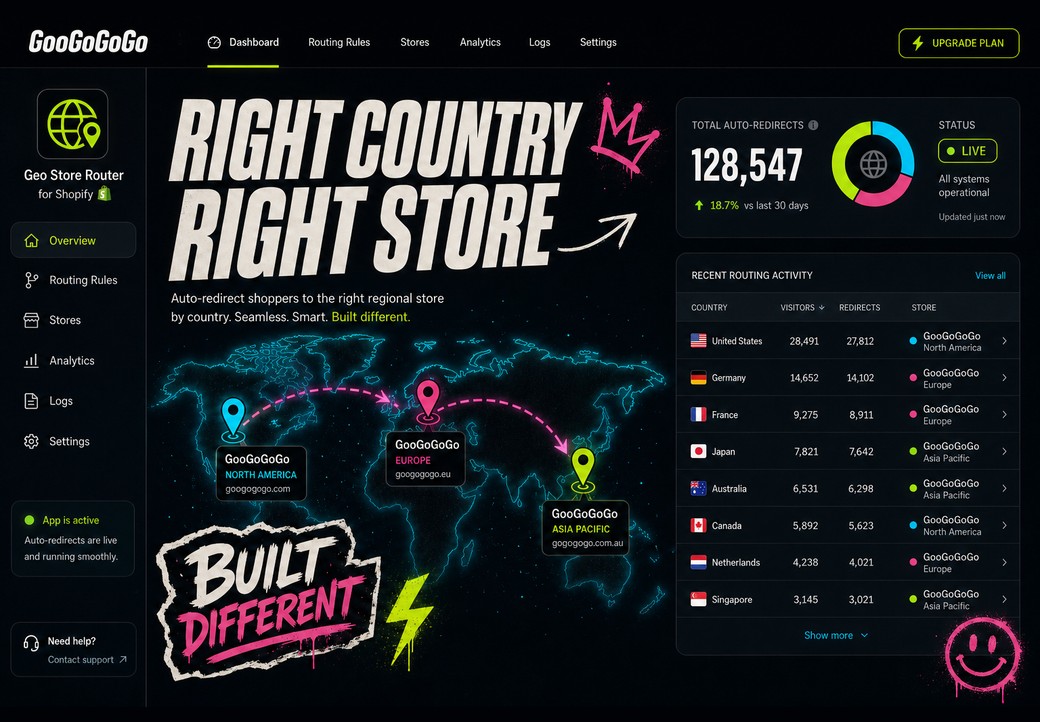
A custom app we designed, built and run. It sends each shopper to the right regional store based on the country they are in — across a merchant's three-store Shopify Plus organisation — with a manual region switcher on the storefront for anyone who wants to override. A Cloudflare Workers backend, an embedded admin, and a theme app extension: nothing is written into the merchant's theme.
05 Choosing a developer
How to choose an app developer
- Ask what they have shipped through OAuth and webhooks, not just what they have prototyped locally.
- Ask how the access token is stored. "In the database" is not an answer; encrypted at rest is.
- Ask whether they use theme app extensions or write into theme files. The second will fail review and leaves debris behind when uninstalled.
- Ask who owns the code and where it is hosted. You should be able to take it elsewhere.
- Ask what happens when the app is uninstalled. Tokens should be destroyed and the storefront should return to normal with nothing left behind.
- Ask for tests. Pricing logic and redirect rules are exactly the kind of code that must not be verified by clicking around.
06 Our approach
How GooGoGoGo builds them
Apps are built on Cloudflare Workers with D1 for storage, an embedded Polaris admin UI, and theme app extensions when the storefront is involved — so nothing is written into the merchant's theme and removal is clean.
Categories the studio has built include live metal-price repricing for jewellery merchants, geo-based multi-store redirection, EU GPSR compliance panels, checkout rules via Shopify Functions, and payout reconciliation.
Because the studio also builds storefronts, the app and the theme are designed together rather than bolted onto each other.
Scope your custom Shopify app
Tell us the workflow no public app covers. We reply within 24h — in your language.
Brief received.
Nice — your project is in. We will read it, reply within 24 hours and line up a short scoping call. Then we build your first concept, free.
Frequently asked questions
How much does a custom Shopify app cost?
It depends almost entirely on scope. An app that reads data and shows it in the admin is a fraction of one that writes to the storefront, handles billing and must survive Shopify's review. The honest answer any developer should give is that scope is set in a discovery pass first, and a number after.
Custom app or public App Store app — which do I need?
Custom distribution apps install straight onto your store and skip Shopify's review, which makes them right for tools built for one merchant. Public apps can be installed by anyone but must pass review before they work on a live store, which takes weeks. If the app is for your business only, custom distribution is almost always the right choice.
Can a custom app be installed on more than one of my stores?
Yes, if it is set up for it. A custom-distribution app can cover several stores that belong to the same Shopify Plus organisation. Without Plus, each store generally needs its own install link.
Will a custom app slow down my storefront?
It should not. Storefront code should be delivered through a theme app extension, loaded asynchronously, and fail silently if the backend is unreachable. The page must never wait on it.
What happens to the app if we stop working together?
You should own the code and be able to host it yourself. Ask about this before the project starts, not after.
Do I need Shopify Plus for a custom app?
No. Plus only matters for installing one custom app across several stores in the same organisation, and for a few platform features. A single store on any plan can run a custom app.
Talk to the studio
Tell us what you are building. The first step is a scoped discovery pass — a prioritised roadmap before any build work starts.